
London JP2.7 - App Store
You'll be able to see results in few seconds.
Publisher Description
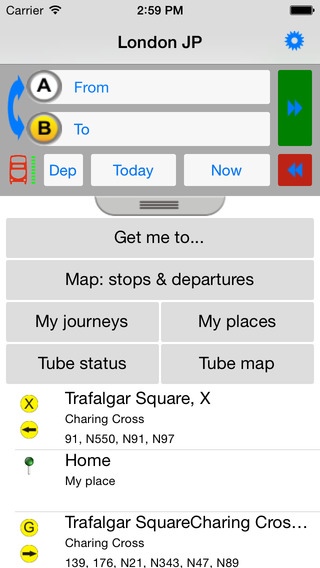
Journey planner, live departures (bus, tube and train), tube status, maps and routes - London transport made easy!
Easy to use with an intuitive layout and flow.
Easy to use point to point journey planner
Live departures boards for bus, tube, train.
Intelligent location search (stations, points of interest, post-codes etc.)
Interactive tube map
and more...
How to use the journey planner:
Select journey end points by text search (station names, points of interest, post codes etc.), selecting markers/pins on the map, choose your current location or a saved favourite place.
If required, override the default journey date & time, (arrive or depart),
If required, specify additional journey options (transport mode / mobility requirements).
Press Go! ( )
Extra features:
View itineraries as a list or on the map.
View transport routes (list of stops or map) with journey/arrival times.
Keep a record of journey plans for viewing off-line.
Built-in, searchable, interactive, geographical Tube Map
Tube status report (Now / weekend)
Reminder alarms for selected itineraries
(long press the itinerary to activate)
Font size settings (select in preferences)
Filters and sort options for departures boards
Seamless connection from journey plans to live departures boards
London journey planning, made easy.
Powered by the Transport for London Journey Planner API
Live London bus and underground departures and status provided by Transport for London
Scheduled departures provided by Traveline / TMU Limited
Rail information contains data provided by Network Rail Infrastructure Limited under the following license:
http://www.networkrail.co.uk/data-feeds/terms-and-conditions/
Key Words: Public Transport, Journey Planner, Route Finder, London UK, Tube, London Underground, London Bus, Countdown, live departures, Train Departures, Rail.
Requires iOS 6.1 or later. Compatible with iPhone, iPad, and iPod touch.
About London JP
The company that develops London JP is TMU Ltd. The latest version released by its developer is 2.7.
To install London JP on your iOS device, just click the green Continue To App button above to start the installation process. The app is listed on our website since 2014-10-22 and was downloaded 0 times. We have already checked if the download link is safe, however for your own protection we recommend that you scan the downloaded app with your antivirus. Your antivirus may detect the London JP as malware if the download link is broken.
How to install London JP on your iOS device:
- Click on the Continue To App button on our website. This will redirect you to the App Store.
- Once the London JP is shown in the iTunes listing of your iOS device, you can start its download and installation. Tap on the GET button to the right of the app to start downloading it.
- If you are not logged-in the iOS appstore app, you'll be prompted for your your Apple ID and/or password.
- After London JP is downloaded, you'll see an INSTALL button to the right. Tap on it to start the actual installation of the iOS app.
- Once installation is finished you can tap on the OPEN button to start it. Its icon will also be added to your device home screen.
Program Details
System requirements
Download information
Pricing
Version History
version 2.7
posted on 2014-10-22
Disclaimer
Official App Store Link
We do not host London JP on our servers. We did not scan it for viruses, adware, spyware or other type of malware. This app is hosted by Apple and passed their terms and conditions to be listed there. We recommend caution when installing it.
The App Store link for London JP is provided to you by apps112.com without any warranties, representations or guarantees of any kind, so access it at your own risk.
If you have questions regarding this particular app contact the publisher directly. For questions about the functionalities of apps112.com contact us.
